


Register Your U9Play Account on u9playweb.com
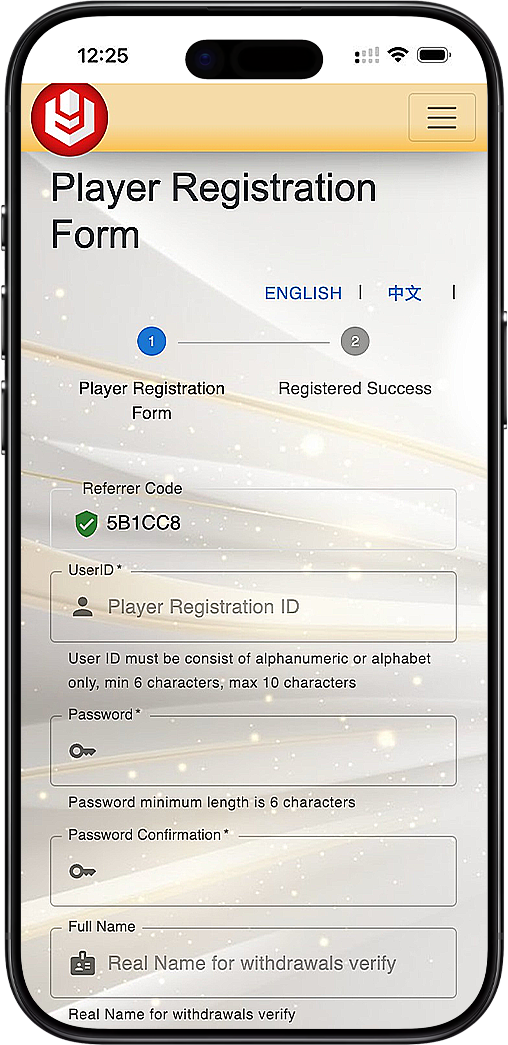
Simple & Secure U9Play Web Registration Process
Step 1: Input Your Referrer Code
Ensure the correct referral code is automatically displayed. This code helps link your account to agent promotions and bonuses.
Step 2: Create Your U9Play Login Credentials
Choose a unique UserID (6–10 alphanumeric characters) and a strong password (minimum 6 characters). Re-enter your password for confirmation.
Step 3: Enter Full Name for Withdrawal Verification
Use your real name as registered with your bank or payment service provider to avoid withdrawal issues later.
Step 4: Select Currency and Mobile Number
Choose your local currency (e.g., MYR) and input your mobile number with the correct country code for verification.
Step 5: Verify with One-Time Password (OTP)
Select your preferred OTP method: OTPq (App), WhatsApp OTP, SMS OTP, or Operator OTP. Download the “OTPq” App if needed for secure verification.
Step 6: Confirm OTP & Complete Registration
Input the received OTP into the field provided. Click “Register Now” to activate your U9Play Web account instantly.
Why Register on U9PlayWeb.com?
Fast, Reliable Registration
U9Play Web offers a quick and seamless registration experience with minimal steps and maximum security.
Real-Time OTP Security
Secure your account with verified OTPs via App, WhatsApp, or SMS. Avoid fraudulent access and ensure safe gameplay.
Full Access to U9Play Features
Once registered, access all games, promotions, and withdrawal features on U9PlayWeb.com with a single login.
Start Your U9Play Journey
Register now through U9PlayWeb.com and enjoy a seamless, secure experience with full access to games and bonuses.
Register Now at U9Play Web - Malaysia Register Now at U9Play Web - Singapore